
08
2025
-
08
Plastic cable ties and cable classification binding
Author:
Organizing Cables with Plastic Zip Ties: A Structured Approach to Classification and Binding
Managing tangled cables in workspaces, home offices, or entertainment centers can be both inefficient and visually unappealing. Using plastic zip ties for cable organization offers a durable, low-cost solution to keep wires neatly grouped and accessible. Below is a detailed guide to help you classify and bind cables effectively while maintaining flexibility for future adjustments.
Identifying Cable Types and Grouping Requirements
Before securing cables, assess the types of wires you’re working with. Categorize them by function, such as power cords, data transmission lines (e.g., HDMI, USB), or audio/video connections. This separation prevents interference between high-voltage and low-voltage cables, which is critical for safety and performance. For example, keep power adapters and extension cords in one group, while separating network cables or peripheral connections into another.
Considering Cable Length and Flexibility
Group cables with similar lengths to avoid uneven bundles that may sag or twist. If some wires need to reach different devices, create subsets within larger bundles using shorter zip ties. For instance, bundle monitor cables together but leave slack near the ports to allow for screen adjustments. This approach ensures cables remain functional without compromising organization.
Selecting the Right Zip Tie Size and Placement
Choose zip ties based on the diameter of your cable bundles. Thicker groups require wider ties, while smaller clusters can use narrower options. Start binding cables at one end, leaving a 1–2-inch gap to accommodate slight movements or repositioning. Position the zip tie perpendicular to the cables to distribute pressure evenly and prevent crimping.
Spacing Zip Ties for Stability
For longer cable runs, add additional zip ties every 6–12 inches to maintain structure. Avoid over-tightening, as this can damage cable insulation or restrict airflow around heat-generating devices. If cables branch off, use smaller ties to secure subsets separately while keeping them connected to the main bundle. This method ensures stability without sacrificing accessibility.
Labeling Bundles for Easy Identification
To streamline future maintenance, label each cable group clearly. Use adhesive tags or permanent markers to note the purpose of each bundle, such as “Printer Cables” or “Router Connections.” Place labels where they’re visible without obstructing cable paths. This step reduces the time spent tracing wires during troubleshooting or equipment upgrades.
Using Color-Coded Systems (Optional)
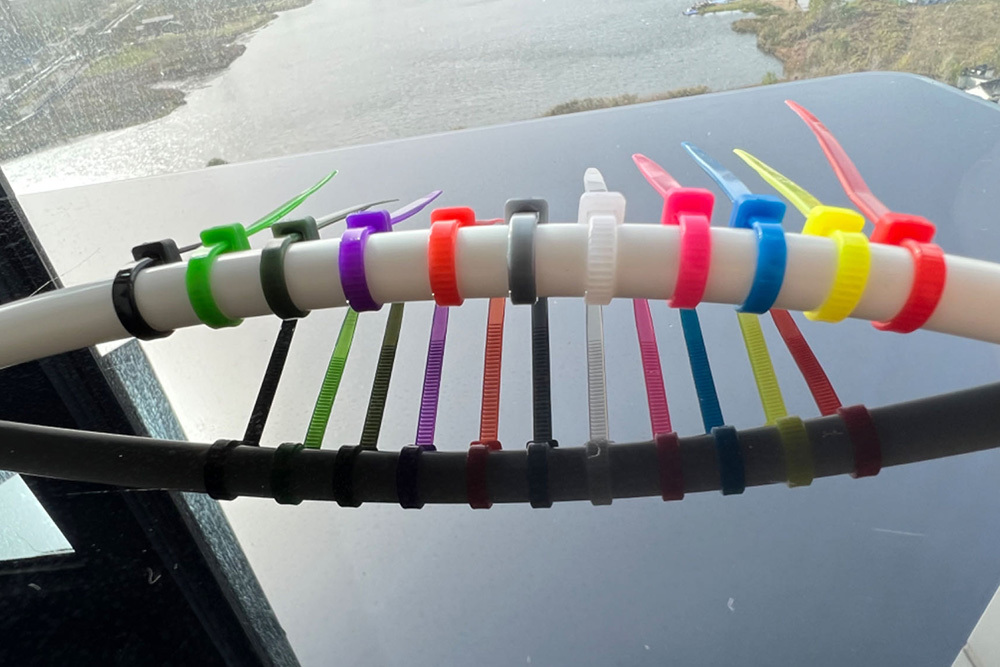
If working with multiple categories, consider assigning colors to different types of cables. For example, use white ties for power cords and black ties for data lines. While not necessary, this visual system can enhance organization in complex setups. Ensure consistency across all bundles to avoid confusion.
Maintaining and Adjusting Cable Groups Over Time
Periodically inspect zip ties for signs of wear, such as cracking or loosening. Replace damaged ties immediately to prevent cables from slipping out of place. If you add new devices, integrate their cables into existing bundles or create separate groups using the same classification method. Avoid overloading zip ties with excessive cables, as this can weaken their grip and lead to disorganization.
Allowing Room for Future Changes
When binding cables, leave slight flexibility to accommodate new connections or reconfigurations. For example, avoid securing cables too close to plugs or sockets, as this may limit access. Use removable zip ties if frequent adjustments are expected, or plan for additional slack in static setups. This foresight ensures your organized system remains functional as needs evolve.
By following these steps, you can transform chaotic cable networks into structured, easy-to-manage systems. Proper classification and binding not only improve aesthetics but also enhance safety and efficiency in any workspace.
plastic cable ties
Previous Page
Previous Page
Hot News
2026-09-15
Ultimate Guide to Nylon Cable Ties: Sizes, Applications, and Selection Criteria
Explore the ultimate guide to nylon cable ties. Learn about PA66 material properties, comprehensive size & tensile strength charts, and outdoor UV applications.
2026-08-28
PA6 vs PA66 for Nylon Cable Ties: How to Choose the Right Material
PA6 and PA66 are two commonly considered materials for nylon cable ties. This guide compares their mechanical performance, heat resistance, toughness, moisture absorption, processing characteristics, cost, and application suitability to help buyers select the right material for their requirements.
2026-04-10
No More Brittleness: All-Weather Performance Ties for Extreme Environments
Tired of cable ties snapping in cold or dry weather? Our impact-modified PA66 ties are engineered for all-weather performance, ensuring maximum flexibility and reliability from Australia to Northern Europe。
2026-01-19
Electric Cable Tie Gun Operating Instructions
An electric cable tie gun is a handy tool that simplifies the process of securing cable ties, making it faster and more efficient compared to manual methods. Whether you're working on electrical installations, organizing cables in a data center, or bundling items for shipping, understanding how to properly use an electric cable tie gun is essential. Here's a detailed guide to help you get started.
2026-01-18
The precise tension control method for cable guns
When working with cable tie guns, achieving the right tension is crucial for ensuring secure and professional-looking installations. Whether you're bundling cables, securing equipment, or organizing items, precise tension control prevents over-tightening, which can damage delicate components, and under-tightening, which may lead to loosening over time. Here are some effective methods to help you master precise tension control with a cable tie gun.